


Creating a scenario, repairing a selector, understanding an image or preparing an accessibility assessment: each task requires different capabilities from an AI model. Our benchmark aims to help teams choose models based on their practical value, response time and cost.
The need: automate more while keeping tests meaningful
Validation teams need to cover more user journeys, keep pace with application changes and analyse results within tight deadlines. AI can help them create tests, reduce some maintenance work and tackle checks that are difficult to express through a simple comparison of values.
But producing more tests is not enough. A scenario must check the right business rules. A repair must still target the right element. An analysis must distinguish an established issue from a hypothesis. And the cost of these operations must remain compatible with how frequently test campaigns run.
The question is therefore: which AI should handle which task, with what evidence and what level of oversight? This is why we compare models in practical Agilitest use cases.
Two distinct uses: preparing a test and calling AI during execution
In Agilitest, AI can be involved at two different stages. Understanding this distinction helps explain the settings, consumption and nature of the results.
A test created with AI assistance can run without AI. If its scenario uses deterministic actions and no execution-time AI features are enabled, running it again does not require calling the model that helped create it.
By contrast, a semantic check, image analysis or self-healing operation does call an AI model when that feature is used. These calls have a cost, a duration and a result to assess. Using AI to summarise a report is another distinct use case: it operates on execution results.
AI helps build the test repository; people retain control; ATS executes the defined actions. AI calls during execution are a configuration choice.
1. Global configuration: choosing the assistant's AI
The first screen controls AI assistance within Agilitest. It allows users to enable AI and choose the provider and model they work with.
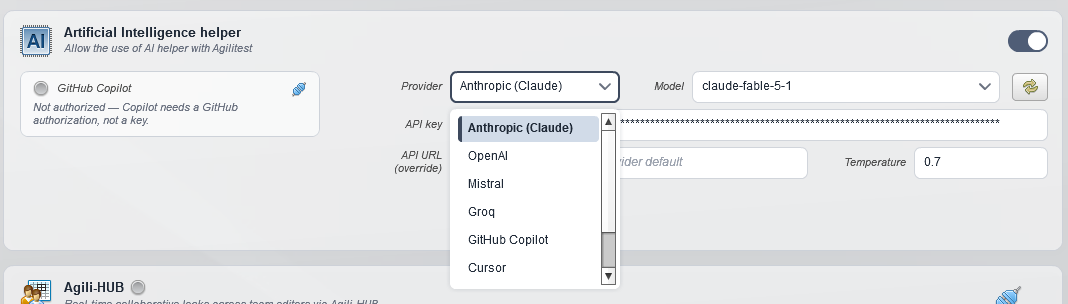
The visible list includes Anthropic, OpenAI, Mistral, Groq, GitHub Copilot and Cursor, but you can also connec to an internal LLM such as Ollama. The connection method depends on the provider: for example, the screenshot states that GitHub Copilot requires GitHub authorisation rather than an API key.
The settings also include an API URL override and a temperature value. The URL specifies the endpoint where the integration supports it; this setting alone does not guarantee compatibility with any service. Temperature is one of the parameters to record when comparing results under reproducible conditions.
The assistant supports project preparation and understanding. It can help formulate a scenario, review actions or work on test repository maintenance. Model selection should therefore consider how well it understands business instructions and the quality of its suggestions, alongside conversational speed.
2. Project configuration: assigning AI to each task
In project properties, the AI tab defines the providers available during test execution and for report summaries. This configuration is separate from the assistant's settings.
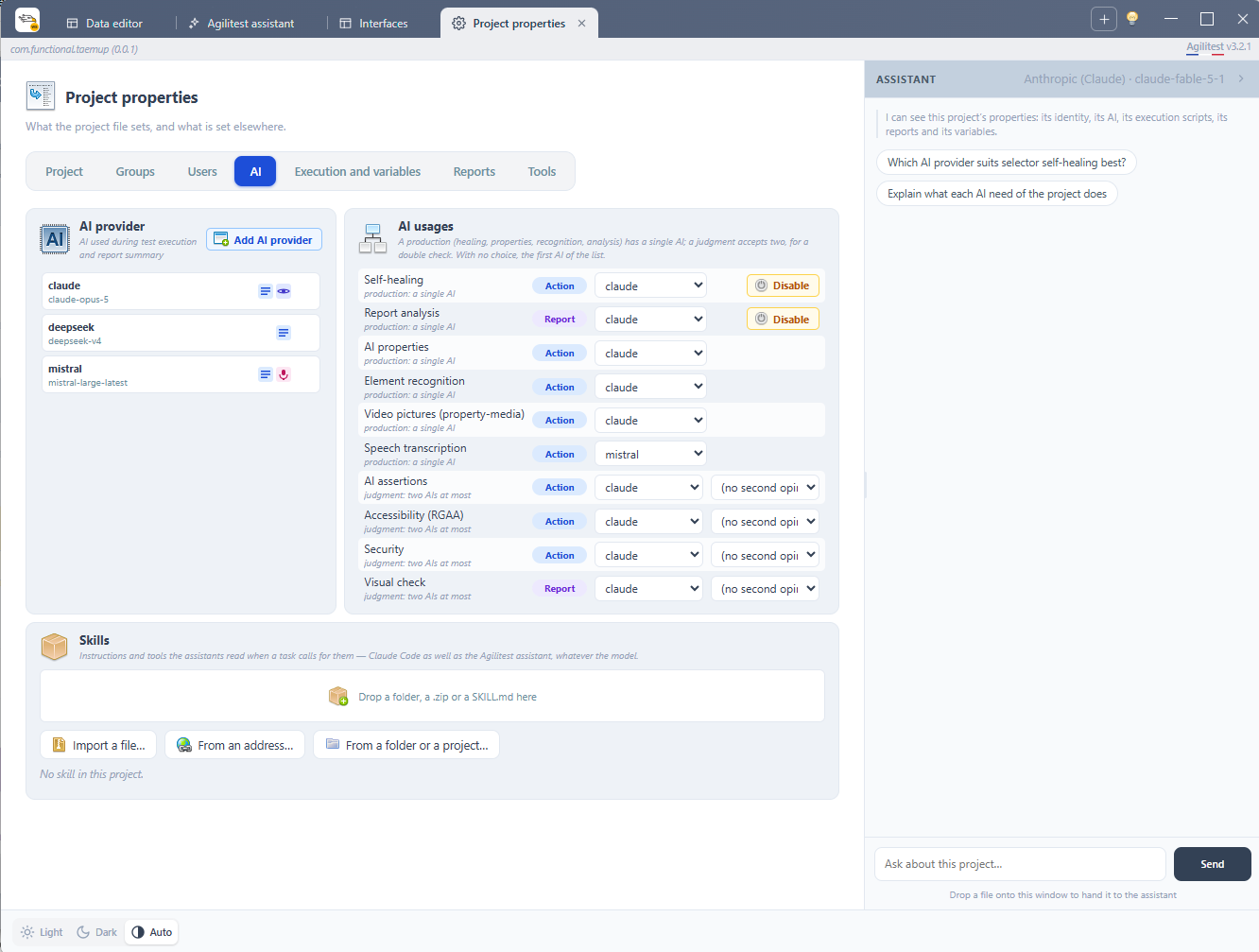
A project does not have to use the same model for every task. It can assign one AI to property extraction, another to accessibility checks and another to self-healing. A more expensive model can therefore be reserved for a task where its quality delivers an observed benefit.
The interface distinguishes two categories: production tasks, handled by a single AI, and judgment tasks, which can use up to two AIs for a double check. A second opinion makes it possible to examine agreement or disagreement; on its own, it does not guarantee accuracy.
The screenshot also states that when no explicit assignment is made, the first AI in the list is used. Reviewing these assignments before running a campaign helps teams control project behaviour and budget.
Configurable uses
These settings describe the available configuration options. They do not mean that every feature is covered in every benchmark edition, or that every model supports every media type.
Skills: supplying useful project instructions
The “Skills” area allows users to import instructions and tools that assistants can use when appropriate, from a file, an address or a folder. It supplies project context and working methods. That context also matters in a comparison: a model guided by detailed instructions is not working under the same conditions as one that does not receive them.
3. AI checks: expressing what must be true
The AI check action lets users express a condition in natural language. In the screenshot, it targets the application root and asks users to describe “What must be true on the whole page”. It also offers different target types: interface element, parameter element, system interface or dialog box.
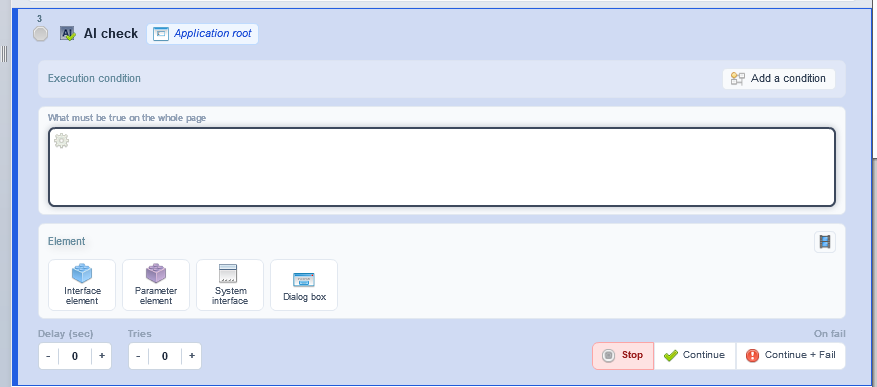
For example, a check could ask whether a confirmation message clearly explains the next step in a process, or whether an order summary is consistent. These illustrate possible instructions; their reliability must be evaluated using the selected data and models.
For a known value, such as an expected amount or identifier, a deterministic assertion remains central. AI judgment becomes useful when a check concerns meaning, relevance or content whose form can vary.
Documents, images, video and audio: choosing the right input
Uses can involve the application's document, a targeted element or multimedia content supplied to the appropriate action. What can be observed depends on the data supplied and the model's capabilities. An AI that receives an excerpt cannot attest to content it has not received.
AI properties produce reusable information; assertions evaluate a condition; media and transcription features process their respective input types. These roles should be distinguished when writing a scenario.
The benchmark must assess the ability to answer correctly and to avoid asserting information that is missing or uncertain. A convincing answer can still be wrong.
4. Self-healing: repairing recognition without weakening the check
An interface change can make a selector obsolete even though the business function is still available. Self-healing can then call the configured model to find a replacement target.

In the supplied example, the original selector contains a class ending in emeraudezzzz. The repair identifies the class ending in emeraude. The report states that one element was found and that its text is €250, as expected.
Repairing the target and validating the business result remain separate operations. Finding an element is not enough: the test must still check that the element shows the expected result.
The “Apply” button allows the proposed correction to be incorporated into the test repository. The supplied execution report also shows self-healing enabled with a displayed budget of 1 per test. This makes the operating limits of the feature visible.
When comparing models, teams should examine their ability to repair genuinely broken recognition, avoid incorrect targets and let a test fail when the business result is wrong. Counting how many tests turn green is not enough.
5. Accessibility: combining automated checks, AI opinions and human validation
The supplied RGAA report shows why AI judgments should be presented with their provenance. RGAA is the French accessibility assessment framework. The report brings together automated findings, AI assessments, suspected non-conformities and checks requiring human intervention.
The examples are concrete: checking whether a text alternative exists is a structural check; assessing whether it correctly describes an image requires context. The report includes assessments of an empty heading, the relevance of image alternatives and animations without a visible stop mechanism.
For each point, readers can find the question, what ATS checked, the elements involved, the finding or AI reasoning, and why a conclusion may still be open.
A status equivalent to “compliant according to one AI” remains identified as a preliminary assessment requiring review. A suspicion is presented as something to confirm. Some checks, such as how a component is actually announced by a screen reader, require human verification.
The report provides a guided audit for revisiting user journeys and answering “Compliant”, “Non-compliant” or “Not applicable”. This organises validation work rather than hiding unresolved questions behind a score.
The displayed automated score must not be presented as the website's overall compliance rate. The report distinguishes that score from criteria with established conclusions, confidence and sample coverage. These indicators answer different questions.
6. Security and report analysis: keeping findings verifiable
The project configuration also includes AI use for security. The scenario described in the report runs check-security [ai] and check-wcag [ai], along with AI properties and a deliberately incorrect element selector.
The label of a security action alone does not describe every vulnerability being investigated. Interpreting its results requires knowing which checks ran and what evidence was collected. A conclusion should be verifiable against observed behaviour.
AI report analysis helps users read results. The quality criterion is how faithfully the summary represents them: does it distinguish a functional error, a recognition problem, a repair and an analysis that remains uncertain? A useful summary supports investigation and lets readers return to the underlying report evidence.
Why publish a benchmark by use case?
These features require different capabilities. Extracting a simple property, assessing visual content and suggesting a replacement selector do not automatically call for the same model.
Our benchmark aims to bring together three dimensions:
- Relevance: result accuracy, adherence to instructions, errors, omissions and the need for human correction.
- Time: call latency and its impact on the campaign.
- Cost: token consumption and call costs in relation to actual usage volume.
Cost per call does not represent the full cost of an activity. Retries, unusable responses and review time also matter. These are criteria to document; they are not all measured in every benchmark export.
A useful comparison requires comparable instructions, data and parameters, along with enough observations. A missing duration remains an unavailable measurement. A human assessment should be explained. Savings calculated from a reference tariff do not prove that another model would have produced an equally good answer.
Benchmark editions should therefore be read as dated observations of the uses they cover. They help teams make choices and plan trials on their own scenarios; they do not establish a universal winner.
Deliberate AI choices, controlled tests
The goal is to decide where AI adds value. The assistant can speed up test repository preparation. Execution-time features can enrich certain checks or support maintenance. In both cases, the team must be able to understand what happened and what evidence supports the result.
By separating assistant configuration from project-level AI assignments, Agilitest lets teams adapt their choices to each task. The benchmark provides evidence to assess and refine those choices while keeping business requirements and human validation central.


