

The Self-Healing Scenario
In this demonstration, we intentionally break an existing functional ATS test, then let Claude repair it interactively using the Agilitest REPL.
The scenario is:
Introduce a defect in the ATS script (wrong selectors / obsolete steps / wrong digit)
Run the test and observe the failure
Use the REPL to explore the UI and locate the correct elements
Remove obsolete steps and fix incorrect actions
Re-run the scenario to confirm functional correctness
Save the corrected ATS script
Execute the final test in standard ATS mode (no AI required)
Key point:
✅ Claude performs diagnosis and repair
✅ The final output is a pure functional ATS script
✅ The corrected test runs normally in CI/CD without Claude or any AI runtime
AI fixes the script
ATS guarantees its execution
The user has a diff feedback on his test
The scenario is:
Introduce a defect in the ATS script (wrong selectors / obsolete steps / wrong digit)
Run the test and observe the failure
Use the REPL to explore the UI and locate the correct elements
Remove obsolete steps and fix incorrect actions
Re-run the scenario to confirm functional correctness
Save the corrected ATS script
Execute the final test in standard ATS mode (no AI required)
Key point:
✅ Claude performs diagnosis and repair
✅ The final output is a pure functional ATS script
✅ The corrected test runs normally in CI/CD without Claude or any AI runtime
AI fixes the script
ATS guarantees its execution
The user has a diff feedback on his test
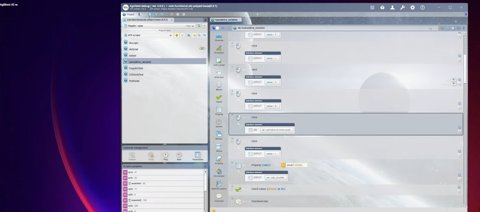
Step 1 — Creating a Controlled Failure
We deliberately introduce errors inside an existing ATS script (obsolete selectors, wrong steps, or incorrect input).
This simulates real-life test drift after UI changes.
The goal is not to regenerate everything — it’s to repair an existing automation asset.
This simulates real-life test drift after UI changes.
The goal is not to regenerate everything — it’s to repair an existing automation asset.
Step 2 — Launching Claude for Repair
Claude is asked to repair the failing script using the Agilitest REPL.
Instead of blindly rewriting code, it starts by reading the existing ATS file and preparing to debug it interactively.
Instead of blindly rewriting code, it starts by reading the existing ATS file and preparing to debug it interactively.
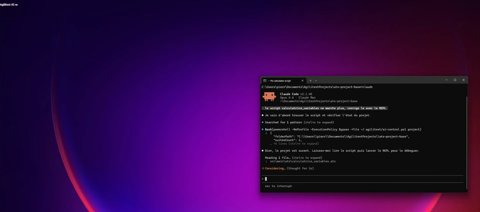
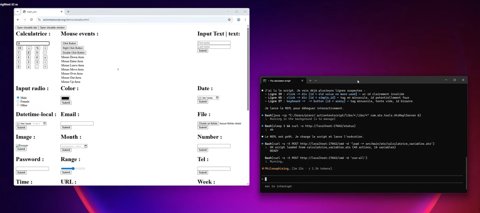
Step 3 — Spotting Suspect Steps and running the Test
Claude scans the ATS script, identifies suspicious actions (obsolete IDs, unexpected clicks, weird keyboard steps), then launches the REPL to reproduce the failure.
This is the beginning of controlled self-healing:
• reproduce
• isolate
• verify
• fix
• validate
This is the beginning of controlled self-healing:
• reproduce
• isolate
• verify
• fix
• validate
Step 4 — Identifying the Root Cause in Real Time
The test fails on a specific step (element not found, wrong selector, unexpected value).
Claude uses REPL exploration commands (find / structured output) to locate the correct element and confirm why the previous selector is invalid.
This prevents “hallucinated locators” and keeps the fix grounded in the real UI.
Claude uses REPL exploration commands (find / structured output) to locate the correct element and confirm why the previous selector is invalid.
This prevents “hallucinated locators” and keeps the fix grounded in the real UI.

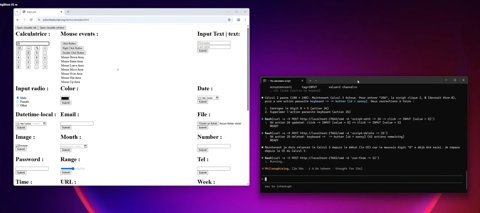
Step 5 — Functional Verification After Fixes
Claude applies repairs (delete obsolete actions, correct wrong input, adjust steps), then re-runs the scenario to confirm the expected functional behavior.
The objective is not just “no error” — it is functional correctness (the test validates real expected results).
The objective is not just “no error” — it is functional correctness (the test validates real expected results).
Step 6 — Saving and Validating Script Integrity (No AI Needed)
Once the test passes interactively, Claude saves the updated file.
Then the script is executed in standard ATS mode to confirm:
• the test is stable
• the test is deterministic
• the test runs as a normal automation asset
At this point, AI is no longer required. The output is pure ATS.
Then the script is executed in standard ATS mode to confirm:
• the test is stable
• the test is deterministic
• the test runs as a normal automation asset
At this point, AI is no longer required. The output is pure ATS.


Step 7 — Summary of Corrections
Claude summarizes the changes (removed obsolete actions, corrected wrong digit, fixed broken selector).
This makes the repair auditable and easy to review.
The final artifact remains:
• readable by humans
• versionable in Git (only impacted lines modified)
• reproducible in CI/CD
• executable without any AI component
This makes the repair auditable and easy to review.
The final artifact remains:
• readable by humans
• versionable in Git (only impacted lines modified)
• reproducible in CI/CD
• executable without any AI component
What This Demonstrates
This demo highlights a key difference between “AI-generated automation” and “AI-assisted, enterprise automation”:
AI assists repair — ATS guarantees execution.
Claude accelerates self-healing by:
• reproducing failures quickly
• exploring the UI via the REPL
• finding the right element with structured feedback
• correcting only what is necessary
• validating functionally before saving
But the outcome is not “AI code” : The outcome is a functional ATS script:
• independent from Claude
• independent from any AI runtime
• replayable in batch execution and CI/CD
• maintainable by test engineers
Self-healing becomes:
• controlled
• auditable
• deterministic
• scalable
AI assists repair — ATS guarantees execution.
Claude accelerates self-healing by:
• reproducing failures quickly
• exploring the UI via the REPL
• finding the right element with structured feedback
• correcting only what is necessary
• validating functionally before saving
But the outcome is not “AI code” : The outcome is a functional ATS script:
• independent from Claude
• independent from any AI runtime
• replayable in batch execution and CI/CD
• maintainable by test engineers
Self-healing becomes:
• controlled
• auditable
• deterministic
• scalable
See Agilitest in action. Schedule a demo
And see the benefits you can unlock from smart test automation.
The tests scenarios can be replayed in ATS, our Open-Source backbone.
For free and forever.
For free and forever.


