

E-commerce AI-driven test
In this demonstration, Claude generates and executes the following test:
✅Explore the e-commerce website
✅Select 3 random products
✅Add them to the cart
✅Capture individual product prices
✅Store them in numeric ATS variables
✅Compute the expected total using variables
✅Retrieve the cart total from the UI
✅Assert that the calculated total equals the displayed total
Claude builds this scenario step by step using the REPL.
But the important part is this:
The final result is a pure ATS functional script.
It does not depend on Claude.
It does not depend on any AI runtime.
It is a standard, executable ATS test.
Once generated, the script can be:
• Replayed in CI/CD
• Executed in batch mode
• Scheduled
• Versioned
• Maintained manually
• Modified without AI
The user explains what he wants
The AI generates the script.
and ATS guarantees its execution
✅Explore the e-commerce website
✅Select 3 random products
✅Add them to the cart
✅Capture individual product prices
✅Store them in numeric ATS variables
✅Compute the expected total using variables
✅Retrieve the cart total from the UI
✅Assert that the calculated total equals the displayed total
Claude builds this scenario step by step using the REPL.
But the important part is this:
The final result is a pure ATS functional script.
It does not depend on Claude.
It does not depend on any AI runtime.
It is a standard, executable ATS test.
Once generated, the script can be:
• Replayed in CI/CD
• Executed in batch mode
• Scheduled
• Versioned
• Maintained manually
• Modified without AI
The user explains what he wants
The AI generates the script.
and ATS guarantees its execution
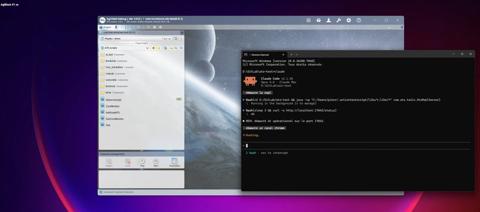
Step 1 — Starting the REPL
Claude starts the Agilitest REPL server.
The HTTP interface is now active, allowing AI to interact with the application step by step instead of generating blind automation code.
The REPL provides:
• Live exploration capabilities
• Structured feedback
• Controlled recording of ATS steps
The HTTP interface is now active, allowing AI to interact with the application step by step instead of generating blind automation code.
The REPL provides:
• Live exploration capabilities
• Structured feedback
• Controlled recording of ATS steps
Step 2 - AI Receives the Test Prompt
The tester asks Claude to:
“Choose 3 random products except Surface, store their prices in numeric variables, compute the expected total, and assert that the cart total matches the calculated value.”
Claude begins by exploring the application before writing any final script.
This prevents hallucinated selectors.
“Choose 3 random products except Surface, store their prices in numeric variables, compute the expected total, and assert that the cart total matches the calculated value.”
Claude begins by exploring the application before writing any final script.
This prevents hallucinated selectors.


Step 3 — Adding Products to the Cart
Claude navigates the website, identifies valid products, and adds them to the cart.
It retrieves structured element information through the REPL instead of guessing DOM locators.
Each action is validated before being recorded.
It retrieves structured element information through the REPL instead of guessing DOM locators.
Each action is validated before being recorded.
Step 4 — Declaring and Using Variables
Claude extracts the product prices and declares numeric variables:
• price1_num
• price2_num
• price3_num
• total_expected
It then computes:total_expected = price1 + price2 + price3
This transforms a UI interaction into a business-level mathematical validation.
• price1_num
• price2_num
• price3_num
• total_expected
It then computes:total_expected = price1 + price2 + price3
This transforms a UI interaction into a business-level mathematical validation.
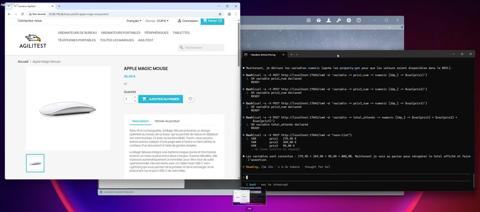

Step 5 — Self-Correction in REPL
An incorrect selector is detected.
Instead of failing the entire script, Claude:
• Identifies the issue
• Searches for a better selector
• Corrects the action
• Continues execution
This illustrates the interactive AI feedback loop made possible by the REPL.
Automation is not generated once — it evolves interactively.
Instead of failing the entire script, Claude:
• Identifies the issue
• Searches for a better selector
• Corrects the action
• Continues execution
This illustrates the interactive AI feedback loop made possible by the REPL.
Automation is not generated once — it evolves interactively.
Step 6 — Adding Assertions and Human-Readable Logs
Claude adds:
• Execution logs for transparency
• A final assertion comparing calculated total and cart total
The script remains human-readable and fully auditable.
This ensures governance and control.
• Execution logs for transparency
• A final assertion comparing calculated total and cart total
The script remains human-readable and fully auditable.
This ensures governance and control.


Step 7 — Executing the Generated ATS Script
The ATS script is compiled and executed.
The console shows:
• Variable values
• Calculated total
• Cart total retrieved from the website
• Assertion result
Validation is successful.
The console shows:
• Variable values
• Calculated total
• Cart total retrieved from the website
• Assertion result
Validation is successful.
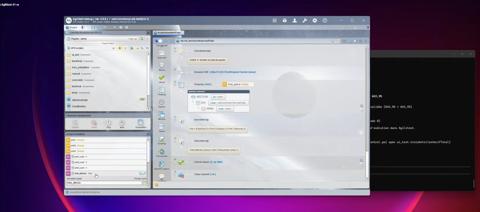
Step 8 — Final Script in Agilitest
The final ATS script is now visible inside Agilitest.
It contains:
• Functional steps
• Variable declarations
• Assertions
• Clean, structured logic
The test is:
• Human-readable
• Multi-platform
• Maintainable
AI-generated but fully controlled
It contains:
• Functional steps
• Variable declarations
• Assertions
• Clean, structured logic
The test is:
• Human-readable
• Multi-platform
• Maintainable
AI-generated but fully controlled
What This Demonstrates
This example shows that AI with Agilitest can:
• Explore dynamically
• Avoid hallucinated selectors
• Create structured ATS scripts
• Use numeric variables
• Perform real business validations
• Self-correct during execution
• Produce stable, enterprise-ready automation
This is not code generation.This is controlled AI-driven test construction.
• Explore dynamically
• Avoid hallucinated selectors
• Create structured ATS scripts
• Use numeric variables
• Perform real business validations
• Self-correct during execution
• Produce stable, enterprise-ready automation
This is not code generation.This is controlled AI-driven test construction.
See Agilitest in action. Schedule a demo
And see the benefits you can unlock from smart test automation.
The tests scenarios can be replayed in ATS, our Open-Source backbone.
For free and forever.
For free and forever.


