

Encrypted passwords management
The default encrypted Key vs. the custom Key
It is crucial to understand the difference between Agilitest's native management and the use of environment variables:
- Agilitest Default Key
Useful for rapid local development. Agilitest and the ATS runner share an internal key that allows for transparent encryption and decryption on your computer
If you want the password to be managed and encrypted directly by Agilitest (for local use, for example, without going through the OS).
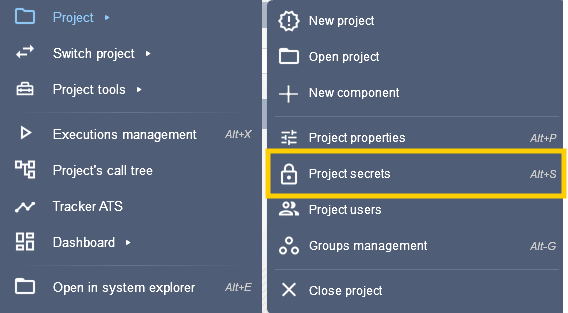
In Agilitest, go to the Project > Project secrets menu
Click on the key button to create a password that will be used as a variable
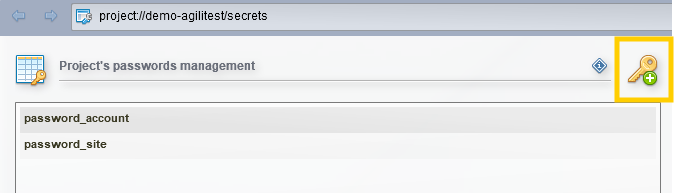
Agilitest will encrypt the value securely (it will not be visible in plain text in the source code).
To call it in the script, use the special menu value or enter: $pass(MY_PASSWORD).
- Custom project/environment key
In a corporate setting or for your CI/CD pipelines (e.g., GitLab CI), using a generic key is not sufficient. You can associate a specific environment key.
If you use an environment variable such as $env(...), it is not “encrypted” by Agilitest itself, but by your orchestrator. If you run your tests through a software pipeline (Jenkins, GitLab CI, GitHub Actions), your CI/CD tool is the one that encrypts the password.
You create a protected secret or credential in Jenkins,GitLab or directly in the exploitation system of your machine, and the tool handles injecting it as a masked environment variable at runtime. This is the industry best practice for separating secrets from code.
Create the environment variable in the operating system
On Windows:
- Using the graphical interface:
- Open the Start menu, type “Environment Variables” and select Edit System Environment Variables.
- Click the Environment Variables... button.
- In the User Variables or System Variables section, click New.
- Name the variable (e.g., MY_PASSWORD) and enter your password, then click OK.
On Linux or macOS :
- Via a terminal :
export MY_PASSWORD="Secret123!"
This will only work for the active session, to make it permanent, add this command at the end of your file: ~/.bashrc or ~/.zshrc
In Agilitest,if you have an enter text action on a password field, simply use the corresponding environment variable by using $env(MY_PASSWORD).
When executed, ATS will retrieve the value stored in the system of the machine running the test and enter it.
Security in Reports and Logs
The primary role of ATS Core is to ensure that decrypted data does not “leak” anywhere other than to the target element of the application:
- Execution logs: The text logs generated by ats-core automatically replace encrypted passwords with security masks.
Agilitest automatically masks these values ($pass) with asterisks (****) in HTML execution reports to prevent security breaches.
- Visual reports: In Agilitest reports (screenshots and videos), fields identified as passwords remain blurred or masked during automatic entry to prevent exposure when viewing the results.
🔶Warning
When using the environment variable, it is essential to set this environment variable with the correct key on the test designers' machines and on the test execution machines. Otherwise, the data will not be decrypted.


