

Why REPL matters for AI-Driven Automation ?
Modern AI models can generate code… but they cannot see your application.
Most AI-generated test scripts still:
• guess selectors,
• hallucinate element paths,
• produce fragile automation,
• require manual correction.
That’s because typical approaches rely on static code generation without runtime feedback.
Agilitest REPL changes that.
Instead of outputting guessed code, the AI:
✅Explores the application through a machine-friendly protocol,
✅Receives structured feedback about actual elements,
✅Validates intent before recording actions,
✅Builds functional tests reliably.
REPL = Read–Eval–Print Loop
In Agilitest, it is a browser-automation API designed for AI agents.
Most AI-generated test scripts still:
• guess selectors,
• hallucinate element paths,
• produce fragile automation,
• require manual correction.
That’s because typical approaches rely on static code generation without runtime feedback.
Agilitest REPL changes that.
Instead of outputting guessed code, the AI:
✅Explores the application through a machine-friendly protocol,
✅Receives structured feedback about actual elements,
✅Validates intent before recording actions,
✅Builds functional tests reliably.
REPL = Read–Eval–Print Loop
In Agilitest, it is a browser-automation API designed for AI agents.
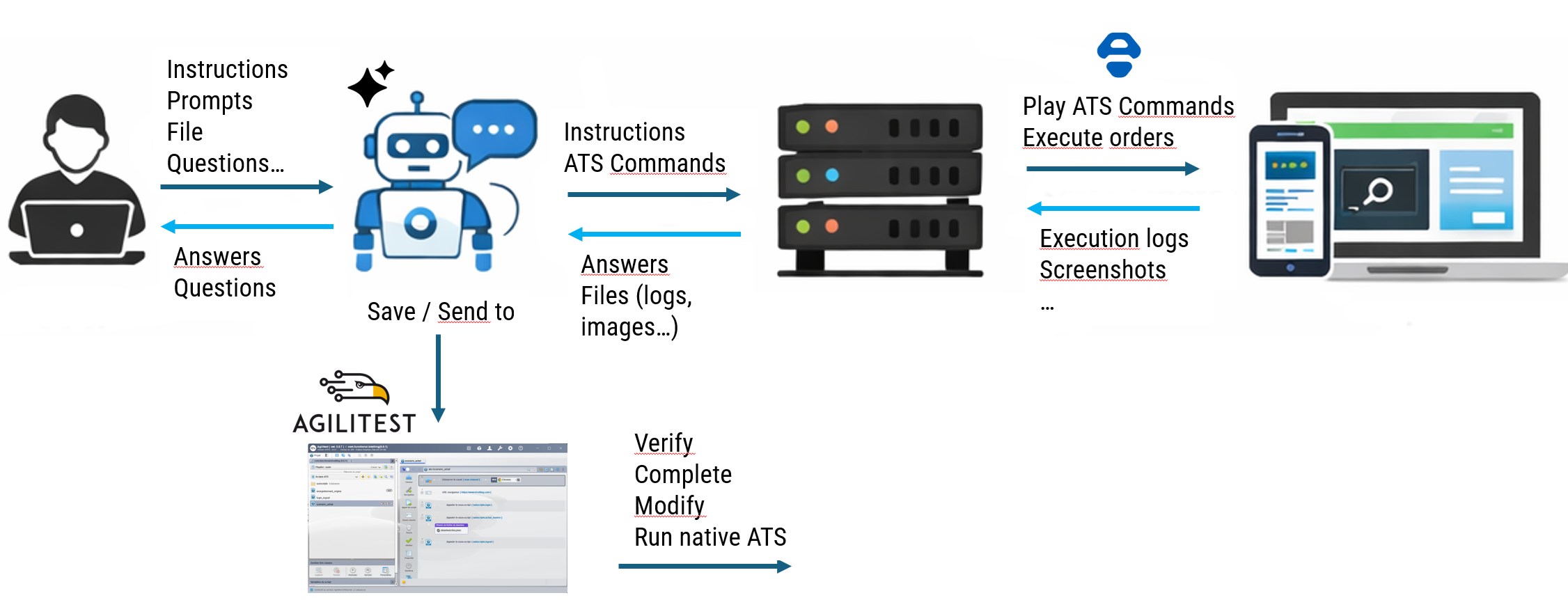
What the Agilitest ATS-REPL Is
The REPL is a lightweight HTTP server that exposes an interface between your application and an AI agent.
Unlike a developer console, it is machine-first:
✅accepts structured commands (
✅returns structured responses (not DOM dumps)
✅differentiates exploration vs. recording
✅logs compactly and consistently
This lets the AI observe before acting.
Unlike a developer console, it is machine-first:
✅accepts structured commands (
find, screenshot, click, keyboard, etc.)✅returns structured responses (not DOM dumps)
✅differentiates exploration vs. recording
✅logs compactly and consistently
This lets the AI observe before acting.
How It Works – In Practice
Step 1 — Launch the REPL Server
Start an AI agent based on the root of your ATS projet starts a REPL on a local port. (e.g., Claude, GPT) connects and begins a session.
The memory.md contains allrequired information for the agent to be informed of how the REPL server works
This session lasts for one scenario and can be torn down after.
Step 2 — Exploration Commands
The AI uses the REPL exploration commands to inspect the page (ATS commands, screenshots) and gets feedback
Key point:
Exploration responses are structured, not guessed.
AI sees real element metadata.
Step 3 — Validate Before Recording
Once an element is found, the AI doesn’t immediately record a step.
Instead it uses the REPL to:
✅verify the element exists
✅confirm correctness
✅choose the most stable action
✅verify that this action insures the functionnal consistency of the test
✅plays the action before going on
Only after this validation is the step saved into a functional ATS script.
This eliminates:
• blind code generation
• brittle selectors
• unstable tests
Step 4 — Interactive Feedback
During all that time, the AI hase given to the user a real-Time Feedback : Summarize detected elements, explain decisions, confirm assumptions, ask for clarification, display validation results
This makes the process collaborative — not opaque : The user always understands what is being created.
Once the scenario is complete, the REPL enables:
✅saving ATS scripts
✅Creating subscripts
✅Generating data files (CSV, JSON)
✅Organizing project structure
✅Files are written directly into the Agilitest project
Step 5 — Open and Control the Project in Agilitest
This is the critical human step.
Once files are generated, the project can be opened directly in Agilitest.
Here, users can:
✔ Verify the generated ATS scripts
✔ Review functional decomposition
✔ Modify steps visually
✔ Adjust selectors if needed
✔ Edit data files
✔ Add new iterations
✔ Refactor subscripts
✔ Run native ATS execution
This is not a black box.
The AI accelerates creation.
The human keeps control.
Start an AI agent based on the root of your ATS projet starts a REPL on a local port. (e.g., Claude, GPT) connects and begins a session.
The memory.md contains allrequired information for the agent to be informed of how the REPL server works
This session lasts for one scenario and can be torn down after.
Step 2 — Exploration Commands
The AI uses the REPL exploration commands to inspect the page (ATS commands, screenshots) and gets feedback
Key point:
Exploration responses are structured, not guessed.
AI sees real element metadata.
Step 3 — Validate Before Recording
Once an element is found, the AI doesn’t immediately record a step.
Instead it uses the REPL to:
✅verify the element exists
✅confirm correctness
✅choose the most stable action
✅verify that this action insures the functionnal consistency of the test
✅plays the action before going on
Only after this validation is the step saved into a functional ATS script.
This eliminates:
• blind code generation
• brittle selectors
• unstable tests
Step 4 — Interactive Feedback
During all that time, the AI hase given to the user a real-Time Feedback : Summarize detected elements, explain decisions, confirm assumptions, ask for clarification, display validation results
This makes the process collaborative — not opaque : The user always understands what is being created.
Once the scenario is complete, the REPL enables:
✅saving ATS scripts
✅Creating subscripts
✅Generating data files (CSV, JSON)
✅Organizing project structure
✅Files are written directly into the Agilitest project
Step 5 — Open and Control the Project in Agilitest
This is the critical human step.
Once files are generated, the project can be opened directly in Agilitest.
Here, users can:
✔ Verify the generated ATS scripts
✔ Review functional decomposition
✔ Modify steps visually
✔ Adjust selectors if needed
✔ Edit data files
✔ Add new iterations
✔ Refactor subscripts
✔ Run native ATS execution
This is not a black box.
The AI accelerates creation.
The human keeps control.
See Agilitest in action. Schedule a demo
And see the benefits you can unlock from smart test automation.
The tests scenarios can be replayed in ATS, our Open-Source backbone.
For free and forever.
For free and forever.


