

AI provider
Within the Agilitest ecosystem, the integration of Artificial Intelligence (AI) marks a major turning point in how automated tests are designed and maintained. Rather than forcing users to write code or deal with the fragility of tests in the face of interface changes, Agilitest delegates certain analysis tasks to large language models (LLMs).
Here is a detailed explanation of the concept of AI providers, their usefulness, their configuration, and their connection to the open-source ats-core engine.
The concept of “AI Provider”
An AI provider in Agilitest is an external or on-premises service (such as a generative AI model like OpenAI’s GPT or Anthropic’s Claude) that you connect to the tool. Agilitest does not run heavy AI models internally, instead, it relies on these providers to send them technical context (for example, the HTML/DOM code of a web page) and receive intelligent analyses.
AI primarily focuses on four key areas:
- AI Self-Healing of actions :This is the most powerful feature. Traditionally, if a developer changes a button’s ID, the test script fails because it can no longer find the element. With auto-repair, the execution engine (ATS) pauses, passes the page context to the AI, and the AI detects the change in intent. It instantly applies the correction so that the test continues without interruption.
- Generation via REPL: You can interact with an AI (such as Claude) using natural language via a REPL (Read-Eval-Print Loop) interface. The AI explores the application in real time and builds the test scenario step by step.
- Security and Accessibility Audits (RGAA): Using specific commands such as check-security [ai] or check-rgaa [ai], the AI analyzes the entire web page and includes an analysis section in the test report to identify vulnerabilities or usability issues.
- Report Generation: AI is used to generate the comprehensive summary report (ats-overview).
Supported providers :
- Cloud services: OpenAI (GPT models) and Anthropic (Claude models).
- Local models : Ollama with AgiLlama specifically.
AgiLlama is a leading AI provider for project properties, distinct from the generic Ollama provider.
It is compatible with OpenAI, but the editor is aware of the specific characteristics of the AgiLlama server (list of models, request format). Models are selected from an “ats-auto” catalog managed by Agilitest, and other models installed on the server are fetched in real time.
Set up an AI provider in Agilitest
Configuration is managed centrally in the project properties so that it is applied to all scripts and runtime environments.
Each project has its own AI provider and its own configuration.
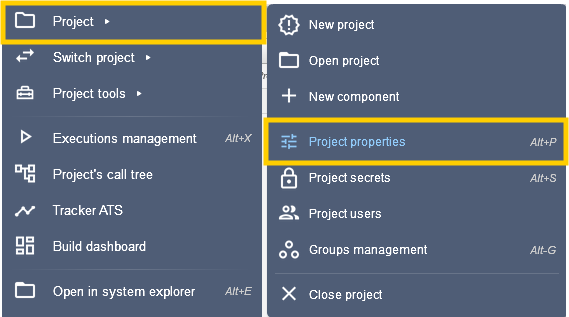
From the side bar, click on Project > Project properties
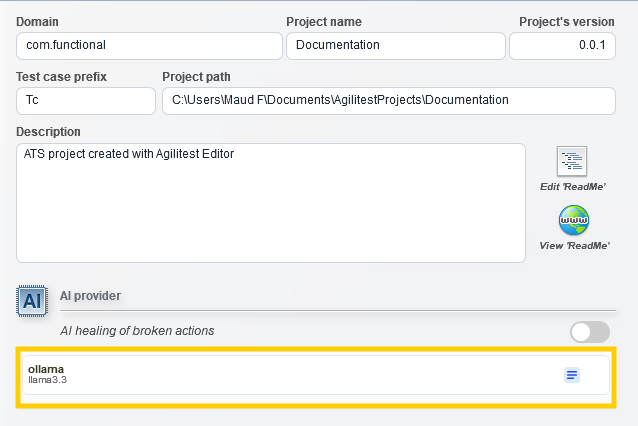
In the Project properties window, click on the AI provider to set it up.
This will open an AI provider window in which you can configure:
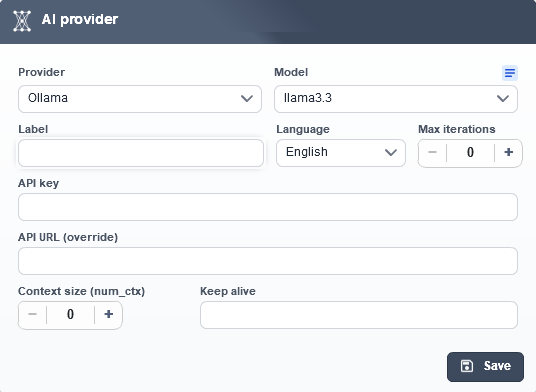
- The provider type and its model: OpenAI, Anthropic, Ollama or AgiLlama.
- API Key: Your private access token if you are using a cloud service (OpenAI / Anthropic).
- API URL: Required for local models or corporate proxies
- Language: This option allows you to select the language of communication (French or English).
- Maximum iterations: Sets the maximum number of “reflection” loops or consecutive correction attempts that an AI agent is allowed to perform to resolve a single problem.
- Context size: This represents the maximum amount of data (typically measured in tokens or kilobytes) that the application will send to the AI model in a single request, including the conversation history, instructions, and technical data.
When you use AI for self-repair (AI Healing) of a failed test or to perform an RGAA/Security audit, Agilitest must send a large amount of information to the model: the current test script, the error message, and, most importantly, the complete application tree (the HTML DOM for web or the widget hierarchy for desktop/mobile). A modern web page can have an extremely large DOM.
💡Tip
If the size of your web page exceeds the maximum context window supported by the selected AI model, the request will fail (Error 400 / Context Window Exceeded). Adjusting this setting allows Agilitest to intelligently truncate unnecessary data to stay within the limits.
Each configured provider has various feature badges:
- Text: Indicates that the model supports the processing of standard text queries, the analysis of script text, and the generation of descriptions or diagnostics.
- Vision (Image Analysis): Refers to a multimodal model capable of processing visual elements. In ATS, this capability is essential for analyzing screenshots of the applications under test, detecting visual anomalies, or validating contrast criteria.
- Tools (Tool Usage / Function Calling): Indicates whether the AI supports the execution of external functions or tools. For example, the AI uses this feature to call internal ATS tools or to execute JavaScript code snippets on the fly on the page being tested.
- Structured JSON output: Indicates the model's ability to structure its responses in a strict JSON format. This is essential for properly populating automated report files (such as the ats-overview.json file intended for use by other AI agents).
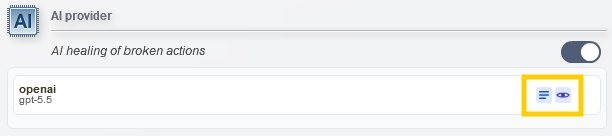
Activate AI self-healing
In the editor, check the case associated with AI healing.
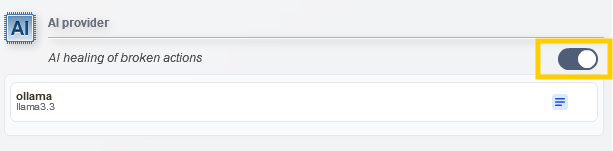
If you later delete your AI providers, Agilitest will automatically disable this mode to prevent a chain reaction of errors
For more information on AI healing, please refer to the “Checks” documentation.


